
Retesting dynamic analysis issues
Retest single or multiple dynamic analysis (DAST) issues directly from scan details to verify vulnerability remediation without running a complete rescan.
Before you begin
To run a targeted issue retest, verify that:
- You have scan execution permissions for the application or asset group.
- All issues selected for a batch retest originate from the exact same scan. You can't combine issues across multiple scans into a single retest.
- The parent scan completed or partially completed with the testing phase initiated.
About this task
Targeted issue retesting executes a focused dynamic test against only the specific URLs, parameters, and vulnerability payload tests associated with the chosen issues. It uses the scan configuration from the parent scan and updates the vulnerability status across both the scan view and the application dashboard upon completion.
Note:
You can trigger targeted issue retests only from the Issues tab of an individual scan details view (). This option is not available from the aggregated, application-level issues inventory.
Procedure
-
Choose one of the following methods to start the retest:
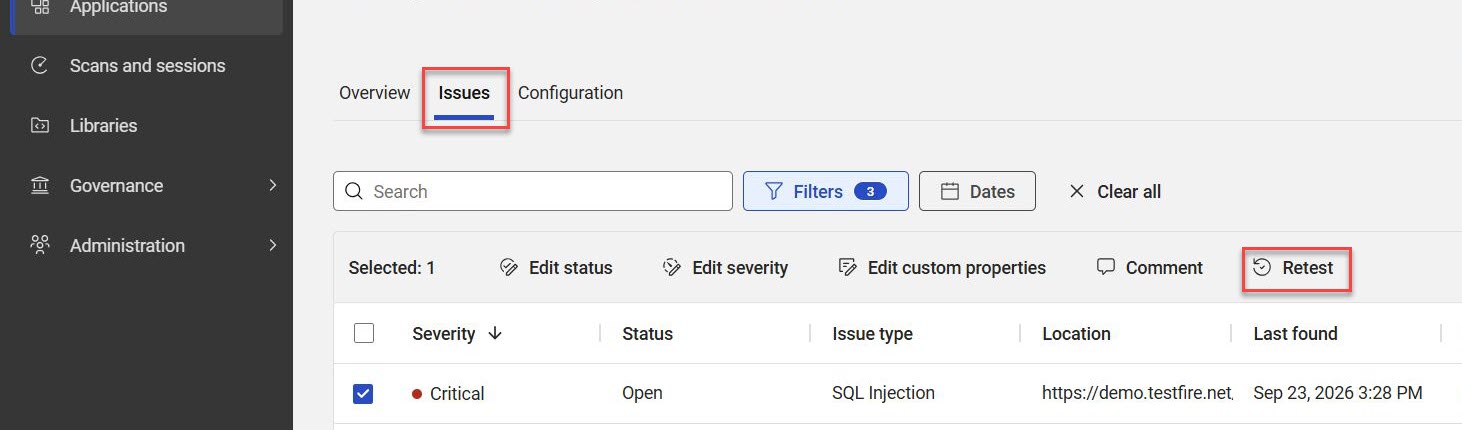
- Table action bar (single or batch issues): Select the checkboxes next to the issues that you want to retest, and then select Retest on the table action bar.
- Issue details menu (single issue): Select an individual issue row to open the details pane, select the More Actions menu (
 ), and then select Retest.
Results
AppScan on Cloud runs the focused test against the selected vulnerabilities. When the retest finishes, the issue lifecycle status updates automatically (for example, to Remediated or Open) in both the scan details and the application dashboard.